Your Figma file is now a website. Seriously.
Figma Sites blends design systems and AI to let you build and publish.
I have been playing around with Figma Sites for a couple of months and I keep refining my workflows and discovering the potential of this new tool. For someone like me who likes to craft and design things visually by dragging, clicking, selecting and having an immediate visual feedback this has been a really fun tool to try out.
When Figma announced Site I wasn’t that excited, I thought this would be just another Framer but made by Figma.
Once I started playing around with it I started realizing the depth and potential of Figma Sites as well as the different workflows it enables designers and developers to work with.

The dream of the "direct-to-web" workflow
There has always been a bit of frustration among designers like me when crafting something in Figma and having it be built by someone else. Often it doesn’t look like what you designed, maybe you wish you could polish things visually once live and now that the implementation is done your Figma file is just a static old dead thing nobody uses anymore.
Why build something so that someone else builds it again? New tools are changing this and Figma Sites keeps the umbilical cord attached between your design file and the live website. There has been a lot of discussion about design to code or code to design with new tools coming up and it’s exciting to finally see design and code moving closer and closer together and hopefully blend at some point.
With Figma Sites we have pretty much a design to code way but when experimenting with it by creating the website you’re currently on I discovered some cool things I wanted to share. In particular I loved the workflows involving your design system component library, the webpages and the AI integration using Figma Make. Let’s dive into it.
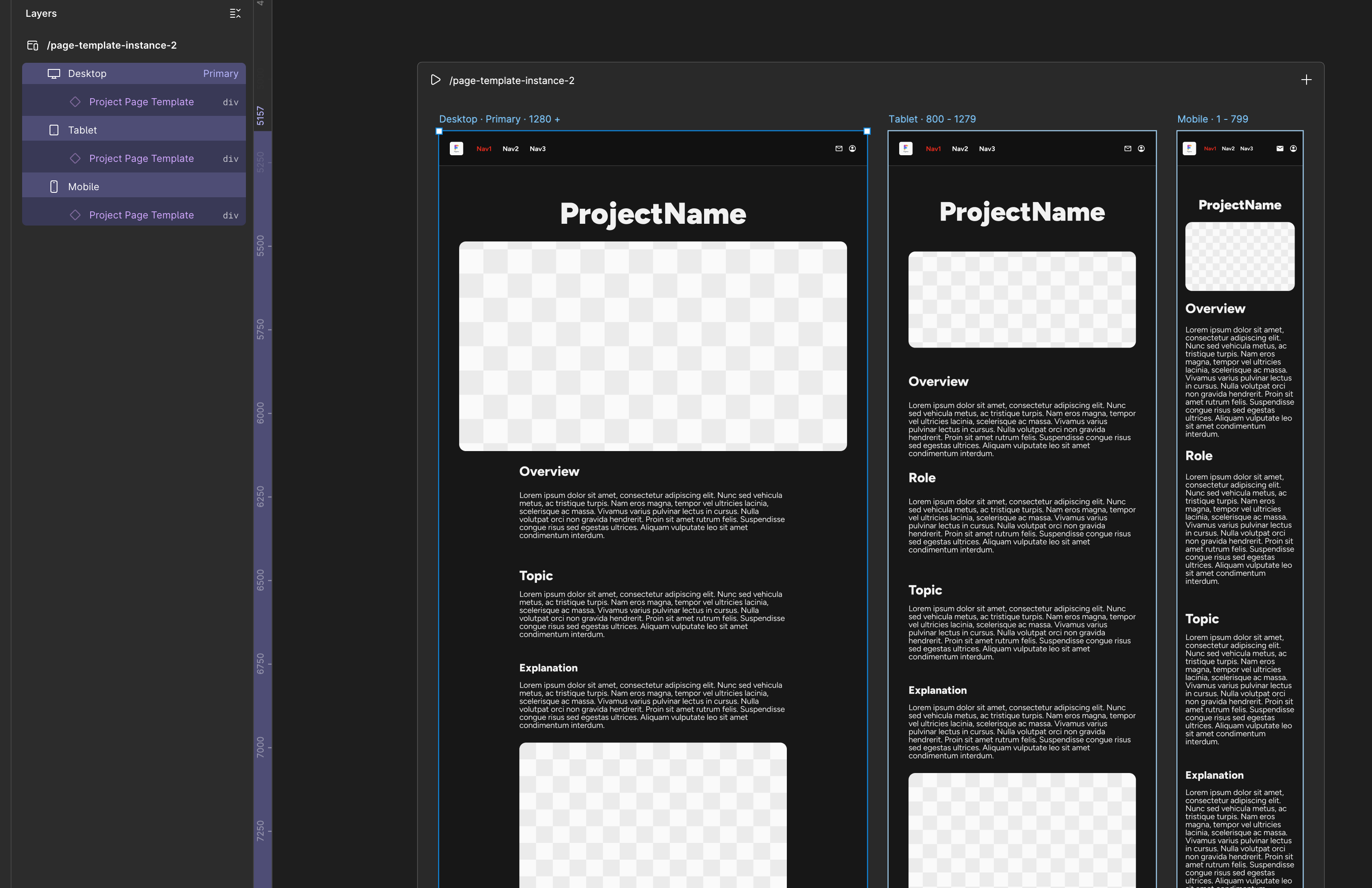
Using template instances inside Figma Sites
Syncing design systems to the web
After watching the first tutorials about Figma Make it was clear to me that the way the tool works is that you create a webpage and in it you can define a standard Figma frame for each breakpoints. With the “selecting matching layers” function you can do edits on all breakpoints at the same time which saves time and makes sure things are the way you want across different viewport sizes. So far so good, but what about use cases where you have many different views that share the same components or templates?
This is where Figma Sites leverages the features of Figma Design and allows you to use instances of components from a component library. This means you can create a page template, save it as a component and then place an instance inside your Figma Sites frames. Why should you do this? Well, because if you update a header navigation component you probably want the update to happen on all your Figma Sites pages.
Figma Sites lets you add libraries to your files the same way Figma Design does. Once you update those libraries an icon button appears at the bottom left of the Figma Sites menu indicating that you can pull new updates.
This was my first “aha” moment, I realized that once you update your design system component library in Figma and publish it, you can then go into your Figma Sites project, pull the update and use the “Publish” button to propagate instantly all your design system Figma library changes to your live website.
This workflow can potentially eliminate design debt by streamlining the updates between your Figma component library and your live website.
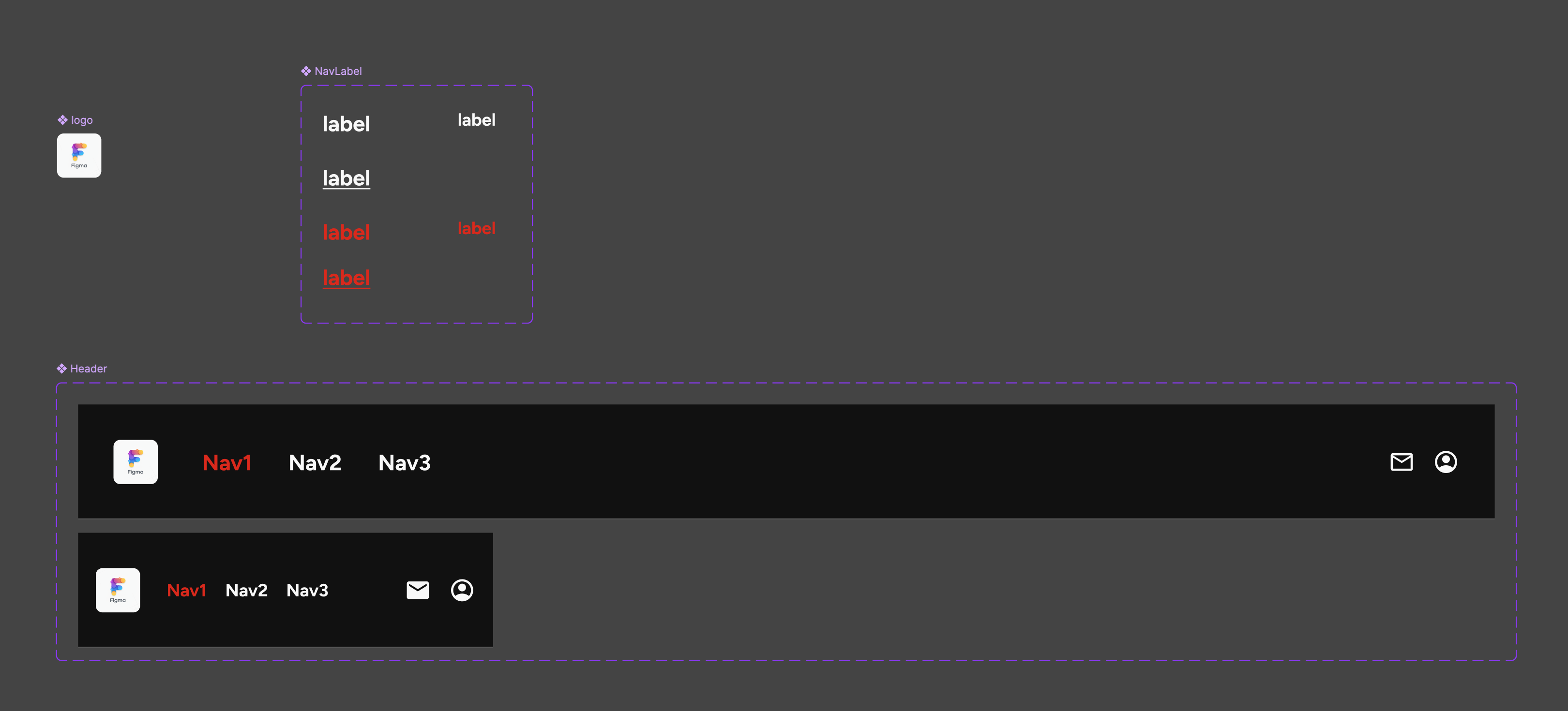
Components from your design system library can be used directly into Figma Site
Figma Make: The "any-code" container
Figma Make is the AI tool Figma introduced in beta a while ago and its features have expanded quite a bit. One thing I really like is how Figma Make blends with your Figma Sites project. People have been building interactive prototypes and apps using Figma Make the same way they have used AI tools like Gemini, ChatGPT, Claude: by writing prompts and getting a working app as a result.
Even though Figma Make can do the same it can also be used in Figma Sites as a flexible container where you can inject React code. Because the Figma Make block is a design-code hybrid you can move it, stretch it and position it using Figma’s visual tools while the code inside executes your logic. This allows you to merge static designs with dynamic functionality for cases where you want a piece of running code standing side by side with your handcrafted designs.
I played around with things like creating an animated shader background, an interactive form, an animated logo. Those were all blocks of code I integrated inside my Figma Sites page as an isolated piece of code which resulted in a Figma object I could interact with. This workflows shows a hint on how in the future designers and developers can work together on the same UI. In this case with Figma Sites a developer can access a project and edit the code of a Figma Make block while a designer crafts some static UI around it. There are some use cases where this can be interesting in a world where we design with code and we code with design.
A shader animation created using Figma Make
The "Publish" button
One great feature in Figma Sites is the big “Publish” button which allows you to very quickly sync your website with your Figma file. Because the website is linked to the original components this means that “maintenance” and “designing” become the same thing, you refine the design and the website follows.
This is perfect for rapid iteration when you want to link your Figma Sites to your Figma component library. Any updates from your design system get very quickly propagated to your Figma Sites project and then to your website. The publish feature allows you to link your personal domain to your Figma Sites project or to use a figma generated link for it. The publishing UI will also warn you of simple accessibility issues your project has such as missing image tags or role settings.
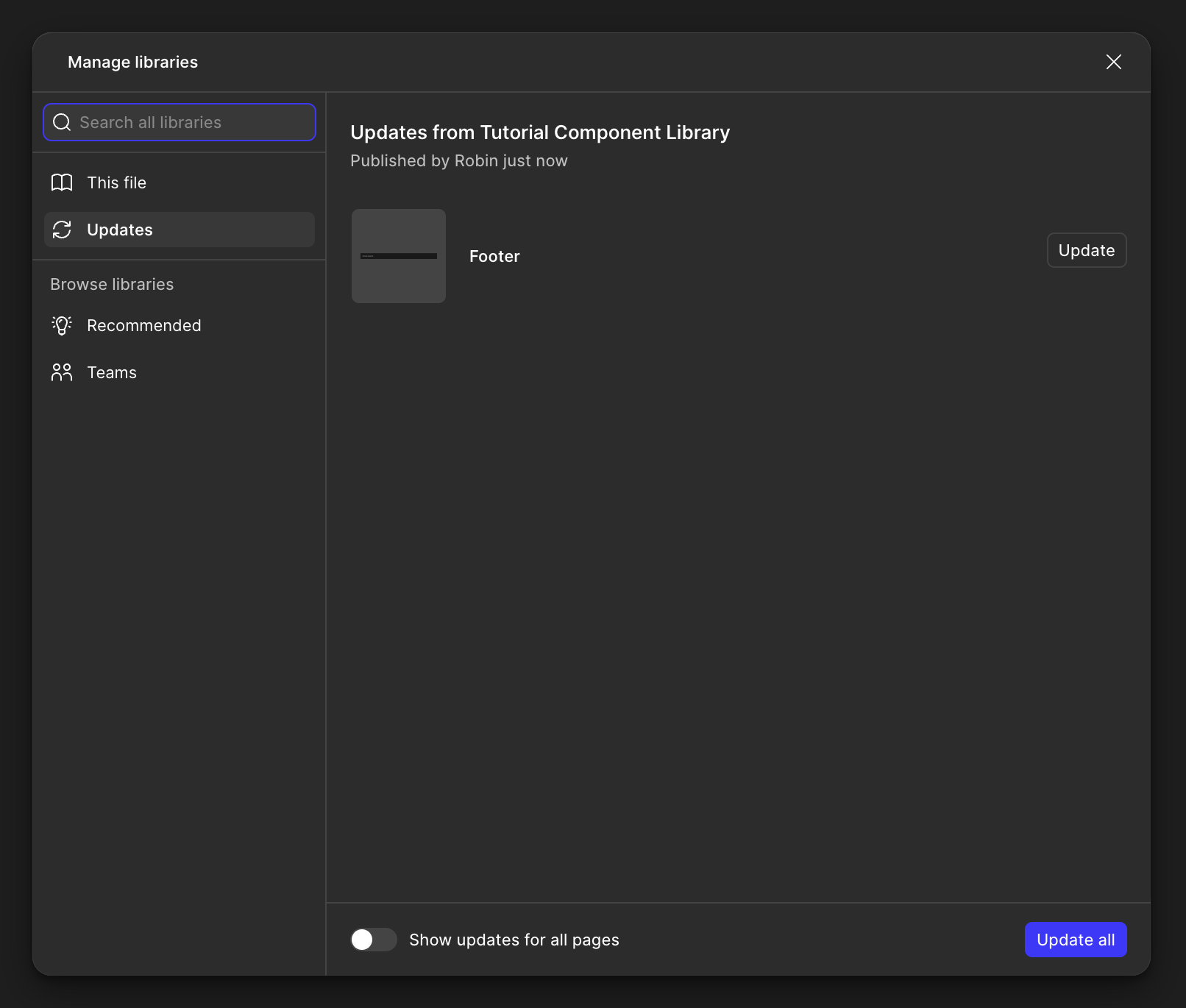
Library updates in Figma Site work exactly like in Figma Design
When (and why) to use Figma Sites
With the current set of features when and why should you use Figma Sites? I currently see three ideal use cases.
The first would be portfolios and personal websites, if you want to use Figma as your design tool of choice to craft a portfolio or personal website the features of Figma Sites are more than enough to allow you to build what you need.
Marketing landing pages, where visual fidelity and rapid updates are more important than complex backend logic are also a great candidate for Figma Sites. Having seen what it takes to maintain and handle Adobe Experience Management for simple marketing pages I am confident using page templates in Figma and building Figma Sites pages with instances of those would allow a much faster workflow and better reusability and conformity with your design system.
Design systems documentations are also a great use case for using Figma Sites. All the components in the component library are most likely built in Figma already and with the help of Figma Make developers can relatively easily import code components into a Figma page using the Figma Make features previously discussed. This would avoid needing other tools to visualize such components and everything could be inside Figma, keeping the costs lower for companies without losing the efficiency of connecting your documentation to Figma sources or code repositories sources.
Those are just three simple use cases but there are more and with Figma iterating Figma Sites and Figma Make I am sure workflows will change and evolve. Figma currently doesn’t seem to challenge app building products like Cursor, Antigravity or Lovable but they are definitely going after Framer or Canva.
Conclusion
In conclusion, Figma Sites is a very interesting new entry in the Figma suite and one I personally enjoyed a lot when creating my personal portfolio and this website. I have used Figma design to create page templates for the articles on this site because I was curious to discover how this workflow would work and I was surprised at how efficient and easy Figma Sites allows you to quickly edit, publish and update a whole website when connected to a design system component library.
Figma Sites empowers designers to be publishers, not just drafters and I hope Figma will work on bringing more code into the design tool so that designers can design using code and work closer with developers for more complex type of projects.
Your Figma file is now a website. Seriously.
Figma Sites blends design systems and AI to let you build and publish.
I have been playing around with Figma Sites for a couple of months and I keep refining my workflows and discovering the potential of this new tool. For someone like me who likes to craft and design things visually by dragging, clicking, selecting and having an immediate visual feedback this has been a really fun tool to try out.
When Figma announced Site I wasn’t that excited, I thought this would be just another Framer but made by Figma.
Once I started playing around with it I started realizing the depth and potential of Figma Sites as well as the different workflows it enables designers and developers to work with.
The dream of the "direct-to-web" workflow
There has always been a bit of frustration among designers like me when crafting something in Figma and having it be built by someone else. Often it doesn’t look like what you designed, maybe you wish you could polish things visually once live and now that the implementation is done your Figma file is just a static old dead thing nobody uses anymore.
Why build something so that someone else builds it again? New tools are changing this and Figma Sites keeps the umbilical cord attached between your design file and the live website. There has been a lot of discussion about design to code or code to design with new tools coming up and it’s exciting to finally see design and code moving closer and closer together and hopefully blend at some point.
With Figma Sites we have pretty much a design to code way but when experimenting with it by creating the website you’re currently on I discovered some cool things I wanted to share. In particular I loved the workflows involving your design system component library, the webpages and the AI integration using Figma Make. Let’s dive into it.
Using template instances inside Figma Sites
Syncing design systems to the web
After watching the first tutorials about Figma Make it was clear to me that the way the tool works is that you create a webpage and in it you can define a standard Figma frame for each breakpoints. With the “selecting matching layers” function you can do edits on all breakpoints at the same time which saves time and makes sure things are the way you want across different viewport sizes. So far so good, but what about use cases where you have many different views that share the same components or templates?
This is where Figma Sites leverages the features of Figma Design and allows you to use instances of components from a component library. This means you can create a page template, save it as a component and then place an instance inside your Figma Sites frames. Why should you do this? Well, because if you update a header navigation component you probably want the update to happen on all your Figma Sites pages.
Figma Sites lets you add libraries to your files the same way Figma Design does. Once you update those libraries an icon button appears at the bottom left of the Figma Sites menu indicating that you can pull new updates.
This was my first “aha” moment, I realized that once you update your design system component library in Figma and publish it, you can then go into your Figma Sites project, pull the update and use the “Publish” button to propagate instantly all your design system Figma library changes to your live website.
This workflow can potentially eliminate design debt by streamlining the updates between your Figma component library and your live website.
Components from your design system library can be used directly into Figma Site
Figma Make: The "any-code" container
Figma Make is the AI tool Figma introduced in beta a while ago and its features have expanded quite a bit. One thing I really like is how Figma Make blends with your Figma Sites project. People have been building interactive prototypes and apps using Figma Make the same way they have used AI tools like Gemini, ChatGPT, Claude: by writing prompts and getting a working app as a result.
Even though Figma Make can do the same it can also be used in Figma Sites as a flexible container where you can inject React code. Because the Figma Make block is a design-code hybrid you can move it, stretch it and position it using Figma’s visual tools while the code inside executes your logic. This allows you to merge static designs with dynamic functionality for cases where you want a piece of running code standing side by side with your handcrafted designs.
I played around with things like creating an animated shader background, an interactive form, an animated logo. Those were all blocks of code I integrated inside my Figma Sites page as an isolated piece of code which resulted in a Figma object I could interact with. This workflows shows a hint on how in the future designers and developers can work together on the same UI. In this case with Figma Sites a developer can access a project and edit the code of a Figma Make block while a designer crafts some static UI around it. There are some use cases where this can be interesting in a world where we design with code and we code with design.
A shader animation created using Figma Make
The "Publish" button
One great feature in Figma Sites is the big “Publish” button which allows you to very quickly sync your website with your Figma file. Because the website is linked to the original components this means that “maintenance” and “designing” become the same thing, you refine the design and the website follows.
This is perfect for rapid iteration when you want to link your Figma Sites to your Figma component library. Any updates from your design system get very quickly propagated to your Figma Sites project and then to your website. The publish feature allows you to link your personal domain to your Figma Sites project or to use a figma generated link for it. The publishing UI will also warn you of simple accessibility issues your project has such as missing image tags or role settings.
Library updates in Figma Site work exactly like in Figma Design
When (and why) to use Figma Sites
With the current set of features when and why should you use Figma Sites? I currently see three ideal use cases.
The first would be portfolios and personal websites, if you want to use Figma as your design tool of choice to craft a portfolio or personal website the features of Figma Sites are more than enough to allow you to build what you need.
Marketing landing pages, where visual fidelity and rapid updates are more important than complex backend logic are also a great candidate for Figma Sites. Having seen what it takes to maintain and handle Adobe Experience Management for simple marketing pages I am confident using page templates in Figma and building Figma Sites pages with instances of those would allow a much faster workflow and better reusability and conformity with your design system.
Design systems documentations are also a great use case for using Figma Sites. All the components in the component library are most likely built in Figma already and with the help of Figma Make developers can relatively easily import code components into a Figma page using the Figma Make features previously discussed. This would avoid needing other tools to visualize such components and everything could be inside Figma, keeping the costs lower for companies without losing the efficiency of connecting your documentation to Figma sources or code repositories sources.
Those are just three simple use cases but there are more and with Figma iterating Figma Sites and Figma Make I am sure workflows will change and evolve. Figma currently doesn’t seem to challenge app building products like Cursor, Antigravity or Lovable but they are definitely going after Framer or Canva.
Conclusion
In conclusion, Figma Sites is a very interesting new entry in the Figma suite and one I personally enjoyed a lot when creating my personal portfolio and this website. I have used Figma design to create page templates for the articles on this site because I was curious to discover how this workflow would work and I was surprised at how efficient and easy Figma Sites allows you to quickly edit, publish and update a whole website when connected to a design system component library.
Figma Sites empowers designers to be publishers, not just drafters and I hope Figma will work on bringing more code into the design tool so that designers can design using code and work closer with developers for more complex type of projects.
Your Figma file is now a website. Seriously.
Figma Sites blends design systems and AI to let you build and publish.
I have been playing around with Figma Sites for a couple of months and I keep refining my workflows and discovering the potential of this new tool. For someone like me who likes to craft and design things visually by dragging, clicking, selecting and having an immediate visual feedback this has been a really fun tool to try out.
When Figma announced Site I wasn’t that excited, I thought this would be just another Framer but made by Figma.
Once I started playing around with it I started realizing the depth and potential of Figma Sites as well as the different workflows it enables designers and developers to work with.
The dream of the "direct-to-web" workflow
There has always been a bit of frustration among designers like me when crafting something in Figma and having it be built by someone else. Often it doesn’t look like what you designed, maybe you wish you could polish things visually once live and now that the implementation is done your Figma file is just a static old dead thing nobody uses anymore.
Why build something so that someone else builds it again? New tools are changing this and Figma Sites keeps the umbilical cord attached between your design file and the live website. There has been a lot of discussion about design to code or code to design with new tools coming up and it’s exciting to finally see design and code moving closer and closer together and hopefully blend at some point.
With Figma Sites we have pretty much a design to code way but when experimenting with it by creating the website you’re currently on I discovered some cool things I wanted to share. In particular I loved the workflows involving your design system component library, the webpages and the AI integration using Figma Make. Let’s dive into it.
Using template instances inside Figma Sites
Syncing design systems to the web
After watching the first tutorials about Figma Make it was clear to me that the way the tool works is that you create a webpage and in it you can define a standard Figma frame for each breakpoints. With the “selecting matching layers” function you can do edits on all breakpoints at the same time which saves time and makes sure things are the way you want across different viewport sizes. So far so good, but what about use cases where you have many different views that share the same components or templates?
This is where Figma Sites leverages the features of Figma Design and allows you to use instances of components from a component library. This means you can create a page template, save it as a component and then place an instance inside your Figma Sites frames. Why should you do this? Well, because if you update a header navigation component you probably want the update to happen on all your Figma Sites pages.
Figma Sites lets you add libraries to your files the same way Figma Design does. Once you update those libraries an icon button appears at the bottom left of the Figma Sites menu indicating that you can pull new updates.
This was my first “aha” moment, I realized that once you update your design system component library in Figma and publish it, you can then go into your Figma Sites project, pull the update and use the “Publish” button to propagate instantly all your design system Figma library changes to your live website.
This workflow can potentially eliminate design debt by streamlining the updates between your Figma component library and your live website.
Components from your design system library can be used directly into Figma Site
Figma Make: The "any-code" container
Figma Make is the AI tool Figma introduced in beta a while ago and its features have expanded quite a bit. One thing I really like is how Figma Make blends with your Figma Sites project. People have been building interactive prototypes and apps using Figma Make the same way they have used AI tools like Gemini, ChatGPT, Claude: by writing prompts and getting a working app as a result.
Even though Figma Make can do the same it can also be used in Figma Sites as a flexible container where you can inject React code. Because the Figma Make block is a design-code hybrid you can move it, stretch it and position it using Figma’s visual tools while the code inside executes your logic. This allows you to merge static designs with dynamic functionality for cases where you want a piece of running code standing side by side with your handcrafted designs.
I played around with things like creating an animated shader background, an interactive form, an animated logo. Those were all blocks of code I integrated inside my Figma Sites page as an isolated piece of code which resulted in a Figma object I could interact with. This workflows shows a hint on how in the future designers and developers can work together on the same UI. In this case with Figma Sites a developer can access a project and edit the code of a Figma Make block while a designer crafts some static UI around it. There are some use cases where this can be interesting in a world where we design with code and we code with design.
A shader animation created using Figma Make
The "Publish" button
One great feature in Figma Sites is the big “Publish” button which allows you to very quickly sync your website with your Figma file. Because the website is linked to the original components this means that “maintenance” and “designing” become the same thing, you refine the design and the website follows.
This is perfect for rapid iteration when you want to link your Figma Sites to your Figma component library. Any updates from your design system get very quickly propagated to your Figma Sites project and then to your website. The publish feature allows you to link your personal domain to your Figma Sites project or to use a figma generated link for it. The publishing UI will also warn you of simple accessibility issues your project has such as missing image tags or role settings.
Library updates in Figma Site work exactly like in Figma Design
When (and why) to use Figma Sites
With the current set of features when and why should you use Figma Sites? I currently see three ideal use cases.
The first would be portfolios and personal websites, if you want to use Figma as your design tool of choice to craft a portfolio or personal website the features of Figma Sites are more than enough to allow you to build what you need.
Marketing landing pages, where visual fidelity and rapid updates are more important than complex backend logic are also a great candidate for Figma Sites. Having seen what it takes to maintain and handle Adobe Experience Management for simple marketing pages I am confident using page templates in Figma and building Figma Sites pages with instances of those would allow a much faster workflow and better reusability and conformity with your design system.
Design systems documentations are also a great use case for using Figma Sites. All the components in the component library are most likely built in Figma already and with the help of Figma Make developers can relatively easily import code components into a Figma page using the Figma Make features previously discussed. This would avoid needing other tools to visualize such components and everything could be inside Figma, keeping the costs lower for companies without losing the efficiency of connecting your documentation to Figma sources or code repositories sources.
Those are just three simple use cases but there are more and with Figma iterating Figma Sites and Figma Make I am sure workflows will change and evolve. Figma currently doesn’t seem to challenge app building products like Cursor, Antigravity or Lovable but they are definitely going after Framer or Canva.
Conclusion
In conclusion, Figma Sites is a very interesting new entry in the Figma suite and one I personally enjoyed a lot when creating my personal portfolio and this website. I have used Figma design to create page templates for the articles on this site because I was curious to discover how this workflow would work and I was surprised at how efficient and easy Figma Sites allows you to quickly edit, publish and update a whole website when connected to a design system component library.
Figma Sites empowers designers to be publishers, not just drafters and I hope Figma will work on bringing more code into the design tool so that designers can design using code and work closer with developers for more complex type of projects.